Appearance
eWizard.js v5.23.5 and eWizard CLI v0.36.1
November 2022
New in eWizard.js
Keep original filename in a site build
With the keepOriginalFilename option, you can prevent the site builder from changing your filenames after you upload your sites to eWizard Editor.
json
// ./settings.json

{
  "clms": {
    "spa": {
      "keepOriginalFilename": [
        "**/common/media/image1.jpg",
        "**/*.pdf",
      ]
    }
  }
}
For more information, see Original filenames in site builds.
Show blocks as images in exported PDFs
Use the new asImageInPdf option to show block content as an image in exported PDFs.
If the asImageInPdf is true, all blocks with the as-image attribute in App.vue are exported to PDF as images.
For more information, see Show blocks as images in exported PDFs.
New in eWizard CLI
Install components from the global CodeArtifact repository
You can install the components from the global repository. For this, add the .wizrc configuration file to the project with the default CodeArtifact repository defined as global:
{
  "codeartifact_repository": "global"
}
If the .wizrc file isn't in the project, you can install the components from the instance-specific repository with the wiz install command.
For more information, see Install a component from the CodeArtifact repository and wiz install.
wiz publish --repository global
With the new --repository global option of the wiz publish command, you can publish components to the global CodeArtifact repository. For this, you must have the permissions on the Admin panel.
You can also publish components to an instance-specific repository, for example, Viseven.
For more information, see wiz publish.
wiz update --structure and --references
Use the new --structure and --references options for the following:
The
--structureoption updates the e-Detailer'sstructure.jsonfile to version 2. As a result, you can use archived slides in eWizard Editor.The
--referencesoption updates thereference.jsonfile and moves it to the./common/resourcesdirectory. As a result, the references aren't localized in eWizard Editor.
For more information, see wiz update --structure and wiz update --references.
Documentation updates
We've updated the following documentation articles:
eWizard CLI
General development
e-Detailers
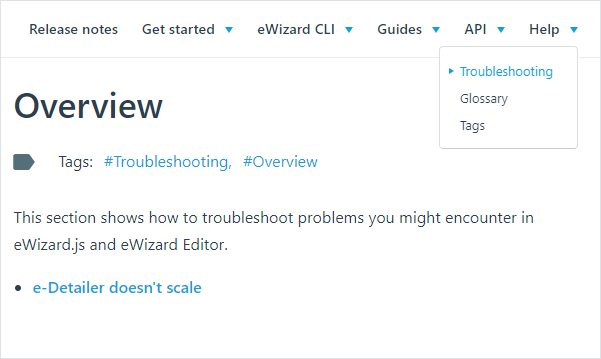
Troubleshooting
Now, you can use the new Troubleshooting section. It contains solutions to issues you might encounter when using eWizard.js. Check it out in the Help section of the navigation bar: