Appearance
eWizard.js v5.12.2 and eWizard CLI v0.27.0
September 2021
With the current release you get:
New eWizard.js framework features
eWizard CLI new commands and options
New in eWizard.js
Performance improvements
With the new release, eWizard.js builds your e-Detailers at least twice as fast for the following target systems:
IQVIA (OCE)
Veeva
PharmaTouch
The speed of building your export depends on the use of custom JavaScript files and the number of slides in your e-Detailer. The updated JavaScript, TypeScript, and Sass loaders reduce the size of the CSS files and optimize their processing.
For older versions of Internet Explorer, the backward compatibility remains without applying the faster builders.
Optimization of mixins
To improve your e-Detailer or email performance, don't register its mixins globally in the ./extensions/ directory. Instead, add them to the specific e-Detailer slides or the email App.vue file. As a result, all your Vue components and blocks don't process these mixins. For example, don't register the mobileContentIndents mixin globally but import it in the App.vue file of your email.
For more information, see Extensions.
Reduce the image size in emails
eWizard.js reduces the size of images you add to your emails in eWizard Editor in the resulting build. The default resolution of images after export is 1400 pixels. This feature improves performance in email clients.
You can configure the image size in the email ./settings.json file. Use the maxImageWidth field to specify the image width in pixels.
For more information, see Email settings.
e-Detailer scaling
Now, you can set up your e-Detailers scale on devices with different screen resolutions. Control scaling with the adaptation scale option in the settings.json file.
For more information, see Responsiveness settings for scaffolding templates.
Custom goTo API method for Viseven CLM
The custom goTo() API method allows you to call an e-Detailer by its ID from another e-Detailer in Viseven CLM. Use the id value from the ./settings.json file of the e-Detailer you want to call by specifying its id as the presentation parameter for the goTo API method in the slide's index.vue file.
For more information, see Parameters of goTo and Viseven CLM settings.
Display the list of blocks when publishing emails to Veeva Vault (PDF)
When you publish emails to Veeva Vault (PDF), eWizard.js parses the email blocks using their IDs and shows the names and preview of these blocks in the Modules step as they appear in the eWizard Blocks tab. If two or more blocks have the same name, eWizard.js creates the new name by adding the number. For example: Content Block 2, Content Block 3.
Layout directory settings for emails
You can rename and set nesting levels of your email layout directory. Change these settings in the .ewizard/settings.json directory of your email template.
New in eWizard CLI
Command suggestions
eWizard CLI shows suggestions if you enter a command that doesn't exist. For example, if you make a typo in the command.

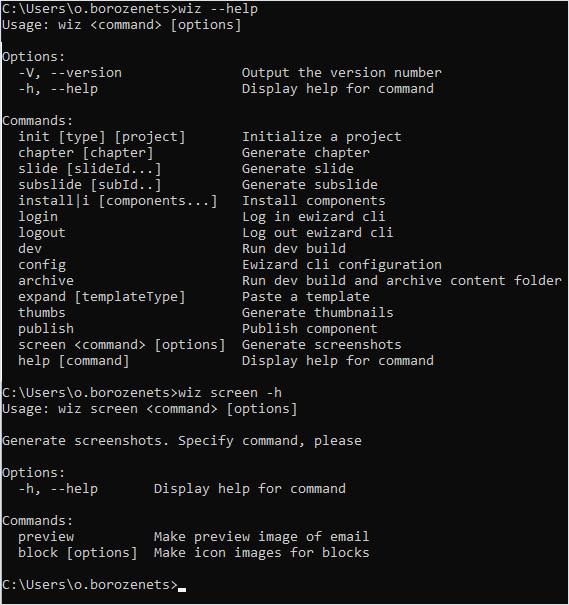
New subcommands for the wiz screen command
Use the newly added subcommands for the wiz screen command:
wiz screen preview to generate a preview screenshot of your email
wiz screen block options to generate icons for the blocks of your email