Appearance
Initialize project
After installing eWizard CLI, you can create a project from one of the available templates:
| Template | Description |
|---|---|
| A standard HTML-formatted email with media assets intended for mailing. You can use this template to initialize both approved and broadcast emails. | |
| email-fragment | A part of the email with updates or additional information. With email fragments, you can re-use approved emails without creating new ones. This way, you create one email and edit it fast with ready-made email fragments. |
| e-Detailer | An interactive presentation. Medreps use e-Detailers to present their products to doctors in an engaging way on their mobile devices. |
| survey | A custom educational presentation created by agreement. You can use surveys both for learning and collecting efficiency stats. |
| component | A reusable Vue instance. You can add pre-existing components like buttons, text, or sliders and customize them in eWizard. And you can also develop your own components. For more information, see Start development. |
| block | A group of components within one container used in emails, sites, and e-Detailers. Several components are combined with some common structure. |
| module | A combination of several blocks that covers a large part of an email or e-Detailer, sometimes a whole page. This is a ready-made item that you can create in eWizard or the target system and reuse it later. For more information about modules, see Blocks in eWizard.js projects and Basic email components. |
| site | A plain landing page that you can brand and fill with elements like feedback form, buttons, and agenda. |
To initialize your project from a template:
Log in to your eWizard instance.
Initialize a project:
shwiz initFor a complete list of the
wiz initcommand options, see wiz init [options].Select the required content item template:
- Enter the option number as your answer.
For example, to initialize an email template, select
1) emailor enter1as your answer.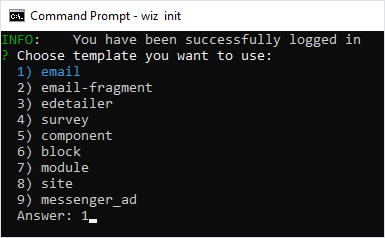
To skip the template selection step, you can initialize the template with
wiz init [template]where[template]is the template type. For example,wiz init email.Specify if you want to use Vuex.
Enter the project description, name, and author.
Press Enter to select the default values.
Your project is initialized with the master template.
Build your project and serve it on a local server as a static site:
shwiz dev --liveWith the
--liveoption, eWizard tracks the changes and continuously builds your project.For a complete list of commands with options, see eWizard CLI commands.
eWizard CLI starts a hot-reloading development server at http://localhost:3000/.