Appearance
eWizard.js v5.3.2
April 2021
Optimized build size for the e-Detailer export to IQVIA (OCE)
Now, when you export your e-Detailer for IQVIA (OCE), the eWizard.js framework optimizes the build size.
Before the improvement, eWizard.js had the following scenario for generating the default build:
Place all the common assets (images, fonts) to one directory.
Copy the directory with common assets to individual slides.
With this improvement, eWizard.js includes to the sequence only the assets required for the slide. The resulting build size is smaller.
If you need the previous behavior, add the common option with the true value.
Include PDF assets in the e-Detailer export to IQVIA (OCE)
When you export your e-Detailer to the OCE Multi-sequence format, you can now include the PDF assets in the generated build for publishing to Veeva Vault PromoMats and IQVIA OCE Sales.
The eWizard.js framework has the following improvements in the resulting build.
When you select the Include a PDF copy to every individual sequence in the resulting build checkbox for the OCE Multi-sequence format in the Export pop-up, eWizard.js adds the PDF assets to the resulting build for each slide containing the PDF asset.
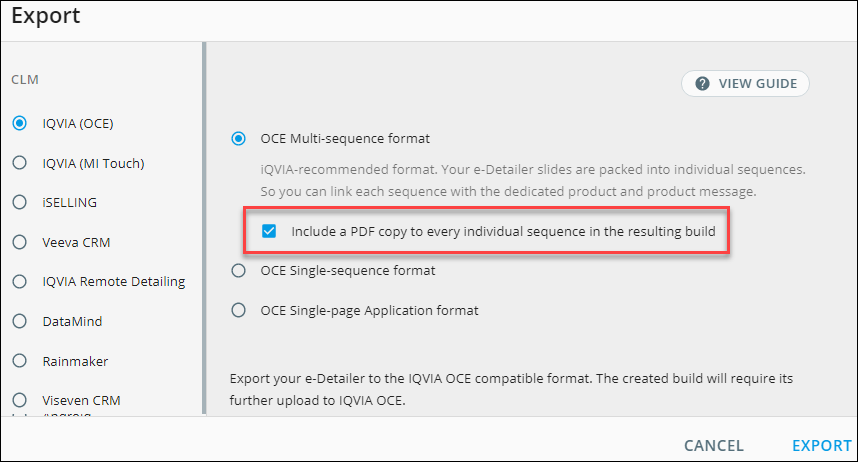
The path to the PDF assets in the build sequence directory structure is:
./001_slide_001/assets/slides/slide_001/media/pdfs/.pdf.When you select the checkbox in the Export pop-up, the
disabledAssetsparameter in the generated build is set totrue.By default, the checkbox isn't selected: the
disabledAssetsparameter in the generated build is set tofalse.
Custom display order in e-Detailers for CT Presenter
Now, when you publish your e-Detailers to CT Presenter, you can use call flows. This feature combines the slides from different e-Detailers into one display order.
To add support for this feature in e-Detailers, we've added the clmDisplayOrder parameter to the settings.json file.
json
"clms": {
  "ctmobile": {
    "clmDisplayOrder": true
    }
  }
With the clmDisplayOrder parameter set to true, the navigation between slides ignores the display order in the e-Detailer structure.json file. Instead, the slides are displayed as set in the CT Presenter call flow for :CT_Mobile:.
Viseven CRM export: Add structure.json to the root directory
The Viseven CRM build now has the structure.json file in its structure as in the standard :SPA: build.
When you export your e-Detailer to the Viseven CRM format, the eWizard.js framework adds the structure.json file to the resulting build root directory.