Appearance
eWizard.js v5.0.0
February 2021
Editor new features
Save faster with the new eWizard Editor
Meet the new eWizard.js engine. With eWizard.js v5.0.0, we've boosted the Editor performance: now x10 more users can develop their items in eWizard Editor simultaneously.
Faster saving and editing. No more building your project in the watch mode every time when you save or edit your item in eWizard Editor. From now on, eWizard.js records the state of the operation to the
state.jsfile. This file is a JavaScript bundle that merges the state of changes and shows them in the browser.More free memory. The dev build processes now don't run in the background when you save or edit your item. Before, every instance of the Editor for every user was building the project for every change.
- x10 more users can work in Editor simultaneously. Reduced the number of the system resources used, which increased the saving speed by at least two seconds.
- Backward compatibility. The faster saving and editing are available for the items created with eWizard.js v5.0.0 or later. No breaking changes for your existing items. You can still work with the items created with the older versions of eWizard.js due to the backward compatibility.
Infrastructure updates
Move all email builders to AWS Lambda
We've launched to production all the email builders in AWS Lambda. This event-driven, serverless computing platform:
Scales the email builders automatically with high availability by running your code in response to each export event.
Runs export requests in parallel and processes them individually, scaling precisely with the size of the workload.
Component development
Update component properties
To describe the properties of your components in the ewizard.config.js file, you can now add:
The
requiredfield. If you set it totrue, Editor shows the warning that this field is mandatory for filling in.jsprops: { propertyName: { required: true } }The
maxLengthfield. You can set the maximum number of characters for the properties with thestringtype.jsprops: { propertyName: { maxLength: 120 } }
Export enhancements
Host more file formats for email export to OCE Sales and HTML
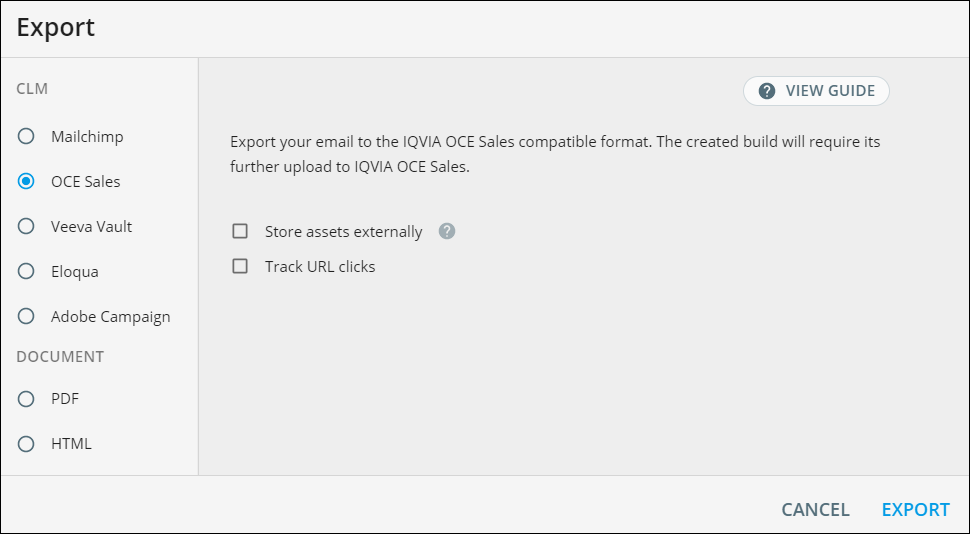
When you export the emails to the OCE Sales or HTML formats, you can now select the Store assets externally option. With this check box selected, eWizard uploads all the assets that you add when you develop your email project to the safe and secure Amazon S3 cloud. We've extended the list of supported file formats for hosting: ICS, PPT, CSV, and XLSX.
Fix images "white line" rendering issue for MS Outlook
Certain email clients (for example, MS Outlook) had a one-pixel border displayed underneath the image. This rendering artifact showed when the height size wasn't integer. That could happen when you set the image width and use auto for its height. Certain email clients had that rendering issue.
To fix this artifact, we've provided the following solution. Now when you export your email to the target system:
The build takes the actual width and height of all images.
Rounds their values up to the next integer number.
Adds the integer height and width pixel attributes to all the images in your email.
Write the framework and builder versions to the resulting build
When you export your e-Detailer, the resulting build now includes the versions of eWizard.js and the builder written as comments in the beginning of the JavaScript bundle files: app.js, index.js, etc. You can use this system information if you need to contact support for any issues related to your e-Detailer content.
Consider the following example in the resulting build.
js
/*!
 * builder: irep-mpa-builder - version: 1.11.0
 * framework: ewizardjs - version: 4.21.0
 */