Appearance
References
eWizard.js supports references in all item types. You can add references to your item with eWizard Editor or using eWizard CLI.
References settings
When you add references in eWizard, eWizard.js stores them in the ./common/resources/references.json file.
json
{
  "ref_oyqo": {
    "name": "<div>My reference 1. This is an example reference to illustrate the <b>References</b> component.</div>"
  },
  "ref_zvua": {
    "name": "<div>My reference 2.</div>"
  }
}
To change the default path, edit the configuration in the ./.ewizard/settings.json file:
json
{
  "path": {
    "common": {
      "references": "common/resources/references.json"
    }
  }
}
References in template
Each reference has its key assigned by eWizard Editor, for example: ref_oyqo. This key is inserted on the template within the <i18n></i18n> tag next to the text that has a reference. For example, in the email template:
html
<!-- ./App.vue -->
<i18n>
{
"eng": {
"title":
"<div style=\"line-height:34px;text-align:left;\">
<a
style=\"text-decoration:none;\"
href=\"http://viseven.com\"
data-url=\"http://viseven.com\"
target=\"_blank\"
>
<span
style=\"
color:#000000;
font-family:arial, "helvetica neue", helvetica, sans-serif;
font-size: 29px;\"
>Your email is there - fill it with content!
<sup refs=\"ref_oyqo\">
</sup>
</span>
</a>
</div>",
"text_1":
"<div style=\"line-height:20px;text-align:left;\">
<span
style=\"
color:#4d4d4d;
font-family:arial,helvetica neue,helvetica,sans-serif;
font-size: 14px;\"
>
Good news: your template is ready! But doesn’t it look a bit too… empty?
Time to fill it with content!
</span>
</div>
<div style=\"line-height:20px;text-align:left;\">
<span style=\"
color:#4d4d4d;
font-family:arial,helvetica neue,helvetica,sans-serif;
font-size: 14px;\"
>
Type the commands for the components you want to add and create the email
masterpiece to be proud of
<sup refs=\"ref_zvua\">
</sup>
</span></div>"
}
</i18n>The reference key is wrapped in the <sup refs=\"\"></sup> CSS style. For example, <sup refs=\"ref_zvua\"></sup>.
The References header (title) has its own key-value pair, for example:
html
<!-- ./App.vue -->

<i18n>
{
  "eng": {
    "wiz_references_3aad":
      "<div style=\"color:#f32a15;\">
          <span style=\"font-family:Verdana, Geneva, sans-serif;\">
            <b>References</b>
          </span>
        </div>"
  }
The end result in the generated HTML:
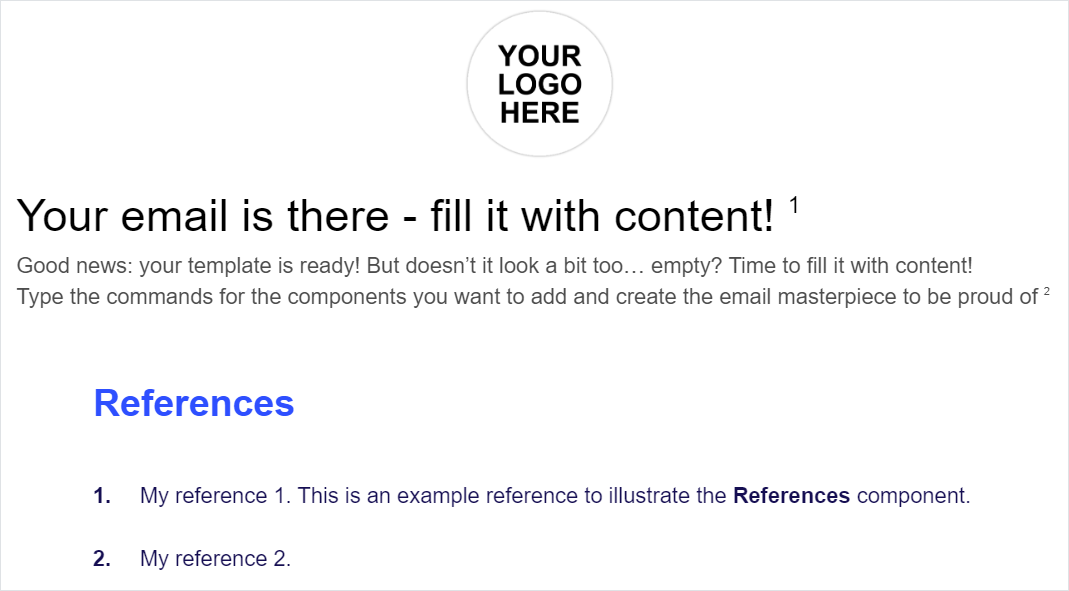
The 1 and 2 superscript references are the ref_oyqo and ref_zvua keys respectively. The References header is the wiz_references_3aad key.
The reference text is taken from the name field values in the references.json file.
The wiz-references component description for each item type see in the following articles:
For localization of references, see Localization.