Appearance
wiz-references
The wiz-references component is an HTML table with the list of references—citations of the sources used on the site or landing page. Each reference has its ID. Use eWizard Editor to add references to the site template. For more information about using References in eWizard Editor, see References in eWizard Editor.
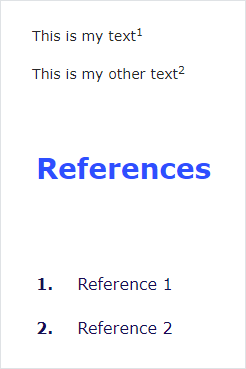
For more information about working with References locally in your project, see References.
Learn more about components
Usage
To use the wiz-references component in your site template:
Add the
<wiz-references></wiz-references>tag to your site template in theApp.vuefile.html<!--./App.vue --> <template> <wiz-root style="background: #ffffff; width: 880px;" class="editable-block"> <wiz-references :header="$t('wiz_references_10e0')" id="wiz-references-40fc" component-name="My references"></wiz-references> </wiz-root> </template>The
idattribute is required for correct display of the component styles in eWizard Editor.Change the component header text in the
<i18n></i18n>localization tag.html<!--./App.vue --> <i18n> { "eng": { "wiz_references_10e0": "References" } } </i18n>For more information, see Localization.
Attributes
You can change the wiz-references component appearance and behavior using the following attributes within the <wiz-references></wiz-references> tag.
componentNameChange the component name that appears on the Properties tab in eWizard Editor.
html<wiz-references component-name="My references"></wiz-references>headerChange the component header (title) that appears on the site layout. Use the
$t('')variable to provide the key-value pair for localization of the header text.html<wiz-references :header="$t('wiz_references_10e0')"></wiz-references>You can add the header text as a
''string without localization:html<wiz-references :header="'My references'"></wiz-references>
Properties
The following properties are available:
| Property | Type | Default value | Description |
|---|---|---|---|
componentName | string | References | The text label displayed in eWizard Editor. |
header | string | References | The component title that appears on the site layout. |