Appearance
wiz-agenda
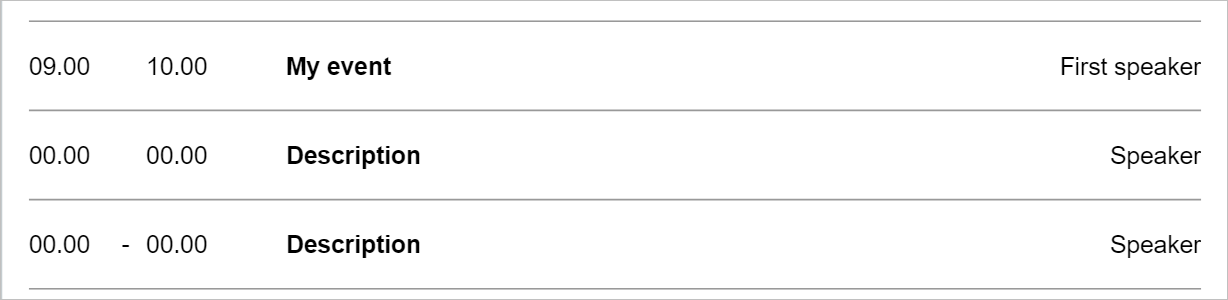
The wiz-agenda component provides agenda features in the email template as a table with the following columns:
Time range
Time separator
Event description
Speaker name
Learn more about components
Usage
To add the wiz-agenda component to your email and change its properties, in the App.vue file:
Add the
wiz-agendacomponent to your email template.html<!--./App.vue --> <template> <div> <wiz-root align="center" style="background: #ffffff; width: 700px;"> <wiz-agenda :speakers="[ { timeFrom: $t('wiz_agenda_speakers_timeFrom_d1c9'), timeSeparator: '', timeTill: $t('wiz_agenda_speakers_timeTill_5979'), description: $t('wiz_agenda_speakers_description_d591'), speaker: $t('wiz_agenda_speakers_speaker_cc4a'), __label: 'Item 1', __id: '25-speakers-0', }, { timeFrom: $t('wiz_agenda_speakers_timeFrom_4cdb'), timeSeparator: '', timeTill: $t('wiz_agenda_speakers_timeTill_e372'), description: $t('wiz_agenda_speakers_description_e138'), speaker: $t('wiz_agenda_speakers_speaker_4cc1'), __label: 'Item 2', __id: '25-speakers-1', }, { timeFrom: $t('speakers_timeFrom_c79d'), timeSeparator: '<div style=\'line-height: 20px;text-align: left;\'><span style=\'font-size:14px;color:#000000;font-family:arial,helvetica neue,helvetica,sans-serif;\'>-</span></div>', timeTill: $t('speakers_timeTill_c6ae'), description: $t('speakers_description_ef1d'), speaker: $t('speakers_speaker_010f'), label: null, }, ]" id="wiz-agenda-d26a" :is-time="true" ></wiz-agenda> </wiz-root> </div> </template>The
idattribute is required for the correct display of the component styles in eWizard Editor.The
__labelattribute is required for displaying the eventITEMlabel in eWizard Editor.The
__idattribute is required for the correct display of the event styles in eWizard Editor.Change the time range, event description, and speaker name in the
<i18n></i18n>localization tag.html<!--./App.vue --> <i18n> { "eng": { "wiz_agenda_speakers_timeFrom_d1c9": "<div style=\"line-height:20px;text-align:left;\"><span style=\"color:#000000;font-family:arial,helvetica neue,helvetica,sans-serif;font-size:14px;\">09.00</span></div>", "wiz_agenda_speakers_timeTill_5979": "<div style=\"line-height:20px;text-align:left;\"><span style=\"color:#000000;font-family:arial,helvetica neue,helvetica,sans-serif;font-size:14px;\">10.00</span></div>", "wiz_agenda_speakers_description_d591": "<div style=\"line-height:20px;text-align:left;\"><span style=\"color:#000000;font-family:arial,helvetica neue,helvetica,sans-serif;font-size:14px;\"><b>My event</b></span></div>", "wiz_agenda_speakers_speaker_cc4a": "<div style=\"line-height:20px;text-align:right;\"><span style=\"color:#000000;font-family:arial,helvetica neue,helvetica,sans-serif;font-size:14px;\">First speaker</span></div>" } </i18n>For more information, see Localization.
Attributes
You can change the wiz-agenda component appearance and behavior using the following attributes within the <wiz-agenda></wiz-agenda> tag.
is-timeShow or hide the time range by changing the
is-timeattribute value. To hide the time range from the agenda, set theis-timeattribute value tofalse.html<wiz-agenda :is-time="false"></wiz-agenda>timeFromEnter the start time of the event as text.
html<wiz-agenda :speakers="[ { timeFrom: $t('wiz_agenda_speakers_timeFrom_d1c9') } ]" ></wiz-agenda>timeSeparatorEnter the time separator between the start time and the end time of the event. Use the default style and change only the separator:
-,—, or:.html<wiz-agenda :speakers="[ { timeSeparator: '<div style=\'line-height: 20px;text-align: left;\'><span style=\'font-size:14px;color:#000000;font-family:arial,helvetica neue,helvetica,sans-serif;\'>:</span></div>', } ]" ></wiz-agenda>timeTillEnter the end time of the event as text.
html<wiz-agenda :speakers="[ { timeTill: $t('wiz_agenda_speakers_timeTill_5979') } ]" ></wiz-agenda>descriptionEnter the event description as text.
html<wiz-agenda :speakers="[ { description: $t('wiz_agenda_speakers_description_d591') } ]" ></wiz-agenda>speakerEnter the speaker name as text.
html<wiz-agenda :speakers="[ { speaker: $t('wiz_agenda_speakers_speaker_cc4a') } ]" ></wiz-agenda>speakersTo change the number of rows with the time range, event description, and speaker name, add or remove objects with the
timeFrom,timeSeparator,timeTill,description, andspeakerfields within thespeakersarray.html<wiz-agenda :speakers="[ { timeFrom: $t('wiz_agenda_speakers_timeFrom_d1c9'), timeSeparator: '', timeTill: $t('wiz_agenda_speakers_timeTill_5979'), description: $t('wiz_agenda_speakers_description_d591'), speaker: $t('wiz_agenda_speakers_speaker_cc4a'), __label: 'Item 1', __id: '25-speakers-0', }, { timeFrom: $t('wiz_agenda_speakers_timeFrom_4cdb'), timeSeparator: '', timeTill: $t('wiz_agenda_speakers_timeTill_e372'), description: $t('wiz_agenda_speakers_description_e138'), speaker: $t('wiz_agenda_speakers_speaker_4cc1'), __label: 'Item 2', __id: '25-speakers-1', }, { timeFrom: $t('speakers_timeFrom_c79d'), timeSeparator: '<div style=\'line-height: 20px;text-align: left;\'><span style=\'font-size:14px;color:#000000;font-family:arial,helvetica neue,helvetica,sans-serif;\'>-</span></div>', timeTill: $t('speakers_timeTill_c6ae'), description: $t('speakers_description_ef1d'), speaker: $t('speakers_speaker_010f'), label: null, }, ]" id="wiz-agenda-d26a" :is-time="true" ></wiz-agenda>
Properties
The following properties are available:
| Property | Type | Default value | Description |
|---|---|---|---|
__id | string | N/A | The automatically generated item ID. |
description | string | <div style='line-height: 20px;text-align: left;'> <strong><span style='font-size:14px;color: #000000;font-family:arial,helvetica neue, helvetica,sans-serif;'> Description</span></strong></div> | The event description or the name of the presentation delivered by the speaker. This object is a part of the speakers array. |
isTime | boolean | true | Shows or hides the time range column on the agenda. |
speaker | string | <div style='line-height: 20px;text-align: right;'> <span style='font-size:14px;color: #000000;font-family:arial,helvetica neue, helvetica,sans-serif;'>Speaker</span></div> | The speaker's name. This object is a part of the speakers array. |
speakers | array | N/A | The array of rows with the time range, event description, and speaker name. This array includes the `timeFrom`, `timeSeparator`, `description`, and `speaker` objects. |
timeFrom | string | <div style='line-height: 20px;text-align: left;'> <span style='font-size:14px;color:#000000; font-family:arial,helvetica neue,helvetica,sans-serif;'> 00.00</span></div> | The start time of the event. For example, 09 AM. This object is a part of the speakers array. |
timeSeparator | string | <div style='line-height: 20px;text-align: left;'> <span style='font-size:14px;color:#000000; font-family:arial,helvetica neue,helvetica,sans-serif;'>-</span></div> | The symbol to visually separate the start time and the end time of the event. For example, an en-dash: 09 AM – 10 AM. This object is a part of the speakers array. |
timeTill | string | <div style='line-height: 20px;text-align: left;'> <span style='font-size:14px;color:#000000; font-family:arial,helvetica neue,helvetica, sans-serif;'>00.00</span></div> | The end time of the event. For example, 10 AM. This object is a part of the speakers array. |