Appearance
System settings
You can modify the content, path, common, plugin, target messenger, and template settings in the .ewizard/settings.json file.
json
{
    "content": {
        "type": "messenger_ad",
        "subtype": ""
    },
    "path": {
        "blocks": "node_modules/@blocks",
        "blocksFilename": "blocks.json",
        "blocksManifest": "common/blocks-library/blocks.json",
        "blocksThemes": "common/blocks-library/blocks-themes.json",
        "localBlocks": "common/blocks",
        "componentsFilename": "components.json",
        "componentsManifest": "common/components/components.json",
        "componentsThemes": "common/components/components-themes.json",
        "localComponents": "common/components",
        "modulesFilename": "modules.json",
        "modulesManifest": "common/blocks-library/modules.json",
        "bundle": "build/dev/app.js",
        "rootComponent": "App.vue",
        "themes": "themes",
        "themePaths": {
            "variables": "theme.scss",
            "variablesJson": "theme.json",
            "main": "index.scss"
        },
        "themesManifest": "themes/themes.json",
        "settings": "settings.json",
        "icon": "icon.png",
        "icon2x": "icon@2x.png",
        "preview": "preview.jpg",
        "assets": ".ewizard/assets.json",
        "claims": ".ewizard/claims.json",
        "documents": "documents.json",
        "layouts": "layouts",
        "common": {
            "i18n": "common/i18n",
            "references": "common/resources/references.json",
            "media": {
                "images": "common/media/images",
                "videos": "common/media/videos",
                "pdfs": "common/media/pdfs",
                "fonts": "common/media/fonts"
            },
        "metadata": {
            "purpose": "common/metadata/purpose.json",
            "targetMessenger": "common/metadata/targetMessenger.json"
        },
        "pages": "pages"
    },
    "archive": {
        "ignore": []
    },
    "template": {
        "url": "https://git.qapint.com/ewizardjs/templates/messenger-ad",
        "version": "3a9c27eb402e5ec61c0b9fce978e5b551464dfe2"
    }
}
The .ewizard/settings.json file has the following fields:
| Field | Description |
|---|---|
content.type | The project type. |
content.subtype | The content subtype. |
path.blocks | The directory where the blocks are stored. |
path.blocksFilename | The name of the file that defines which blocks appear on the elements panel in eWizard Editor. |
path.blocksManifest | The path to the file that defines which blocks appear in eWizard Editor. |
path.localBlocks | The directory where the local blocks are stored. |
path.componentsFilename | The name of the file that defines which components appear on the elements panel in eWizard Editor. For more information, see Component availability in eWizard Editor. |
path.componentsManifest | The path of the file that defines which components appear on the elements panel in eWizard Editor. |
path.componentsThemes | The path to the file with the components that are used for specific dynamic themes. |
path.localComponents | The directory with the file that defines where the local components are stored. |
path.modulesFilename | The name of the file that defines which modules appear on the elements panel in eWizard Editor. |
path.modulesManifest | The path to the file that defines which modules appear on the elements panel in eWizard Classic. The field doesn't affect eWizard Editor. |
path.bundle | The path to the file with the development build. |
path.rootComponent | The root file where you edit a the messenger ad layout. |
path.themes | The directory where the themes are stored. |
path.themePaths.variables | The name of the file with the dynamic theme styles. |
path.themePaths.variablesJson | The name of the file with the dynamic theme styles. Each theme has its own file. |
path.themePaths.main | The name of the file with the dynamic theme variables. Each theme has its own file. |
path.themesManifest | The path to the file that defines what themes are used in the project. |
path.settings | The name of the file with the messenger ad settings. |
path.icon | The name of the file with the messenger ad icon. |
path.icon2x | The name of the file with the large version of the messenger ad icon. |
path.blocks | The name of the file with the block icon. |
path.preview | The name of the file with the project preview image. The image is generated automatically, or you can create it manually when you upload the template to NaviGate. NOTE: that your manually created image is automatically updated when you work with it in eWizard (create, upload, or edit it, and modify metadata). When you upload a messenger ad with a manually added image to NaviGate, and then add this channel to templates for reuse, the following behavior occurs in eWizard Library: • If you create a new messenger ad from this template without changing any metadata, the manually added image will remain. • If you change the messenger ad theme or other metadata field, the image will be regenerated. |
path.assets | The path to the file with the asset settings. |
path.claims | The path to the file with the claim settings. |
path.documents | The path to the file that defines what documents are exported as PDFs. |
path.common.i18n | The directory with content localization. For more information, see Localization. |
path.common.media.images | The directory with common images. |
path.common.media.videos | The directory with common videos. |
path.common.media.pdfs | The directory with common PDFs. |
path.common.media.fonts | The directory with common fonts. |
path.common.references | The path to the file that defines which references appear in eWizard Editor. For more information, see References. |
path.metadata.targetMessenger | The path to the file with the target messenger settings for messenger ads. |
path.icons.blocks | The path to the generated block icons. For more information, see Generate icons for blocks. |
path.archive.ignore | Use the array of glob patters to exclude the files from the archive. |
template.url | The link to the repository with the messenger |
template.version | The version of the messenger ad template generated after you initialize a messenger ad. |
View all fields in .ewizard/settings.json
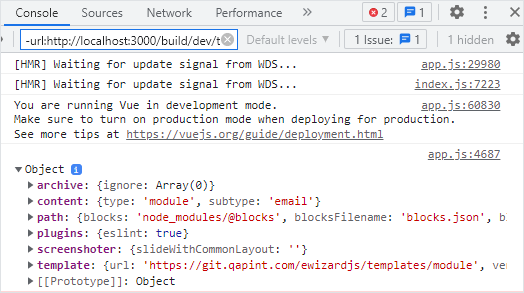
You can check all the fields available in the .ewizard/settings.json with a development build.
To view all fields from the .ewizard/settings.json file, add the console.log method to the App.vue file of your project.
html
<!-- App.vue -->

<script>
export default {
  mounted() {
    console.log(EWIZARDJS.SYSTEM_SETTINGS);
  },
};
</script>
You can see the object with all the fields of .ewizard/settings.json in the browser console after running the wiz dev --live command.