Appearance
SSO authentication
In support of your business flows, eWizard is flexibly integrated with the number of external systems. One of the external systems is Veeva Vault PromoMats. eWizard supports Veeva Vault PromoMats flows in terms of item creation, modular content, approval, and end usage. Access to Veeva Vault PromoMats from eWizard is available for authenticated users.
On your demand, eWizard can be configured to allow SSO authentication to access Veeva Vault PromoMats-connected options within the platform.
Logically, SSO authorization to Veeva Vault PromoMats consists of two parts: web and API; where the web part is implemented with the SAML protocol, and the API is based on the OpenID Connect.
SAML
SAML requires explicit trust between a website and a customer identity provider (IdP). No need to provide and store information from users as upon the explicit trust principle, all information about any user is inevitably available. The SAML provider usually must be coded in advance and requires the website federation with only selected identity providers.
In Veeva Vault PromoMats, SAML is responsible for the SSO authentication web interface.
OpenID Connect
OpenID Connect is an identity layer on top of the OAuth 2.0 protocol. In Veeva Vault PromoMats, OpenID Connect grants API access to resources from Veeva Vault PromoMats. Since eWizard accesses Veeva Vault PromoMats via API, it's necessary to set up the OpenID Connect profile for a security policy assigned to a user. As a result, OpenID allows you to verify the identity of end users based on the authentication performed by the authorization server, and obtain basic profile information about end users.
SSO authentication setup
To set up SSO authentication, an administrator must do the following:
Set up the SAML profile (for web interface).
Set up the OpenID Connect profile (for REST API access).
Create a security policy using these two profiles.
Assign the created security policy to a user.
Both SAML and OpenID Connect profiles can be set up to different identity providers. For example, ADFS 4.0 can be used to set up SAML, and Azure AD—for OpenID Connect and vice versa.
From our side, we recommend using the same identity provider for both OpenID Connect profile and access to eWizard. In this case, the procedure of authentication/authorization to Veeva Vault PromoMats goes under the hood; however, it's still secure.
Setting up the OpenID Connect profile
To set up OpenID Connect profile for the REST API access, follow these instructions.
Please consider the list of identity providers supported by Veeva Vault PromoMats:
| IdP | Vault (Supported) SAML | VFM Supported OAuth/OIDC | Veeva Snap Supported OAuth/OIDC |
|---|---|---|---|
| ADFS 2.0,3.0 | X | ||
| ADFS 4.0 | X | X | X |
| PingFederate—8.x, 9.x | X | Y | X |
| Okta | X | 19R1 | X |
| Exostar | X | ||
| Siteminder | Y | ||
| PingOne | Y | ||
| OneLogin | Y | Y | |
| Centrify | Y | ||
| Liferay | Y | ||
| VMware Identity Manager | Y | ||
| Azure AD | Y | X | |
| Oracle IDM | |||
| Auth0 | Y | ||
| IdentityNow | Y |
Y = Used by Veeva customers but not officially tested by Veeva.
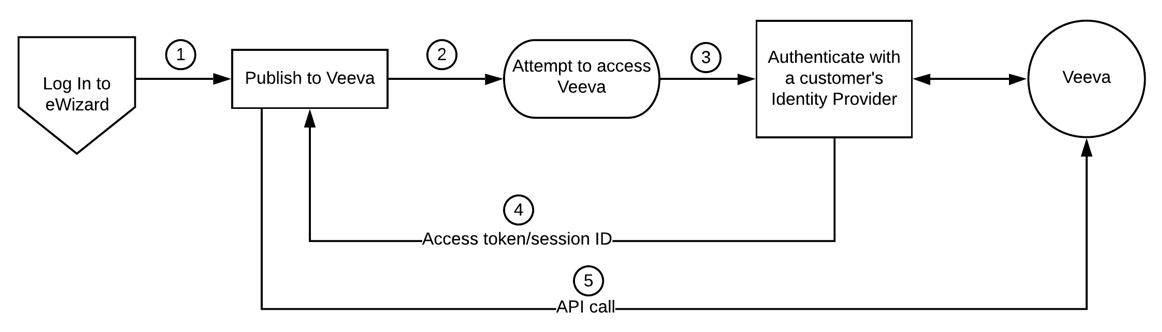
In this case, the flow is as follows:
A user logs in to eWizard. To publish items to Veeva Vault PromoMats or to use assets from Veeva Vault PromoMats, they need to access Veeva Vault PromoMats. For this, the authentication/authorization is required, that's set up using the customer IdP. The user passes the identity check, receives the Veeva Vault session ID token, and is allowed to access resources from Veeva Vault PromoMats.
eWizard as an IdP
eWizard can function as an identity provider as well. In this case, access to Veeva Vault PromoMats requires the same authentication as to eWizard, since the identity checks are similar and require the same information. As users have already authenticated to eWizard, this procedure goes under the hood. As a result, the session ID token is granted to them almost immediately after they've requested access.
Although the procedure is simplified, it's safe and secure, as the security is ensured by the OpenID protocol.