Appearance
Help chat
The Help chat is a great tool to solve any issues or get to know more about eWizard features available for you. Utilize it when you need assistance from eWizard Support, have a suggestion for improvement, read the product news, or want to browse the product documentation articles.
To open the Help chat, click  on the right of the top panel of any eWizard page.

The Help chat pops up at the bottom right with the Home space open.
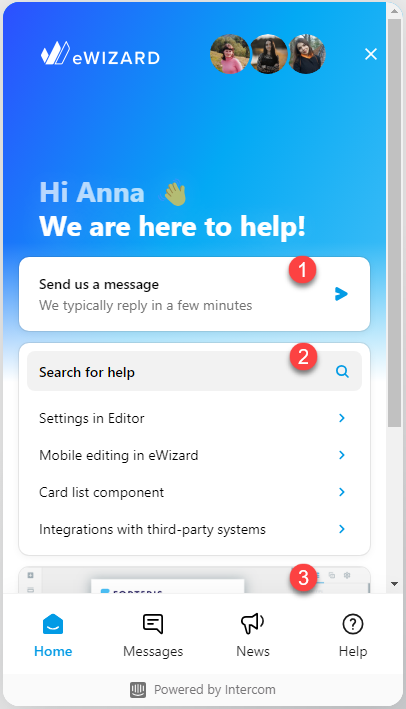
The Home space contains 3 apps by default:
| App | Description | Notes |
|---|---|---|
Messages [1] | Chat with the operator and get live assistance from eWizard Support | Click Send us a message every time you need to address eWizard Support. In the messenger chat that opens, enter your question—the operator connects promptly. Your past conversations are stored in the Messages app. When you encounter a new issue, be sure to start a new conversation and not reopen any previous chats. |
Help [2] | Explore the eWizard Help center collections or use the search bar to streamline finding the article of your interest | Click the Search for help field to open the Help app and find the required article. The preconfigured AI chatbot empowers your search efficiency. |
News [3] | View the latest updates from the eWizard team shared with you |
Contact eWizard Support to customize your Help chat to match your business requirements.
Help chat security
eWizard is being developed with the following security measures and practices:
SAML (SSO) support. On demand, the two-factor authentication can be activated.
Password complexity standards support. Account data is stored with the PBKDF (bcrypt) function.
Data is located on Amazon Web Services in the USA.
Infrastructure and data are distributed among three AWS availability zones. It ensures the smooth operation even if any processing center fails.
All servers are located within our virtual private cloud (VPC) along with the network access control lists (ACL). ACLs prevent access to eWizard network for any unauthorized requests.
On the application level, we keep audit logs for all actions. These logs are sent to Graylog for analysis. Archives are stored on Amazon S3.
On the Help chat side, access to customer data is granted to the authorized staff only. Help chat operates using the HTTPS protocol strictly.
We involve independent security experts to test vulnerabilities in the chat application and infrastructure twice a year.
Intercom, the Help chat provider, complies with the following:
Service Organization Controls (Soc2) (Type II) Trust Services Principles
Privacy Shield
Cloud Security Alliance
Learn more about Intercom security measures.
Intercom abides the General Data Protection Regulation.