Appearance
System settings
You can modify the content, path, common, plugin, and template settings in the .ewizard/settings.json file.
json
{
  "content": {
    "type": "banner",
    "subtype": ""
  },
  "path": {
    "blocks": "common/blocks-library",
    "blocksFilename": "blocks.json",
    "blocksManifest": "common/blocks-library/blocks.json",
    "modulesFilename": "modules.json",
    "modulesManifest": "common/blocks-library/modules.json",
    "localBlocks": "common/blocks",
    "componentsFilename": "components.json",
    "localComponents": "common/components",
    "bundle": "build/dev/app.js",
    "rootComponent": "App.vue",
    "themes": "themes",
    "settings": "settings.json",
    "icon": "icon.png",
    "icon2x": "icon@2x.png",
    "preview": "preview.jpg",
    "templatesManifest": "templates.json",
    "templates": "templates",
    "common": {
      "i18n": "common/i18n",
      "references": "common/resources/references.json",
      "media": {
        "images": "common/media/images",
        "videos": "common/media/videos",
        "pdfs": "common/media/pdfs",
        "fonts": "common/media/fonts"
      }
    }
  },
}
The .ewizard/settings.json file has the following fields:
| Field | Description |
|---|---|
content.type | The project type. |
content.subtype | The content subtype. |
path.blocksFilename | The name of the file that defines which blocks appear on the elements panel in eWizard Editor. |
path.blocksManifest | The path to the file that defines which blocks appear in eWizard Editor. |
path.localBlocks | The directory where the local blocks are stored. |
path.componentsFilename | The name of the file that defines which components appear on the elements panel in eWizard Editor. |
path.localComponents | The directory that defines where the local components are stored. |
path.modulesFilename | The name of the file that defines which modules appear on the elements panel in eWizard Editor. |
path.modulesManifest | The path to the file that defines which modules appear on the elements panel in eWizard Classic. The field doesn't affect eWizard Editor. |
path.bundle | The path to the file with the development build. |
path.themes | The directory where the themes are stored. |
path.settings | The name of the file with the banner settings. |
path.icon | The name of the file with the banner icon. |
path.icon2x | The name of the file with the large version of the banner icon. |
path.preview | The name of the file with the project preview. |
path.templatesManifest | The path to the file that defines templates to use for creating banners in eWizard Editor. |
path.templates | The path to the catalog with banner templates. |
path.common.i18n | The directory with content localization. For more information, see Localization. |
path.common.media.images | The directory with common images. |
path.common.media.videos | The directory with common videos. |
path.common.media.pdfs | The directory with common PDFs. |
path.common.media.fonts | The directory with common fonts. |
path.common.references | The path to the file that defines which references appear in eWizard Editor. For more information, see References. |
path.banner.thumbnail | The path to the file with the thumbnail. For more information, see wiz thumbs [options]. |
path.banner.thumbnails | The path to the directory with the thumbnails for all themes except current. For more information, see Thumbnails for themes. |
View all fields in .ewizard/settings.json
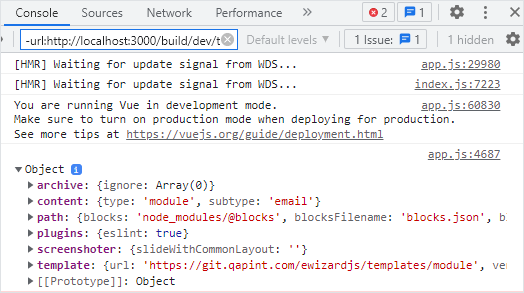
You can check all the fields available in .ewizard/settings.json with a development build.
To view all fields from the .ewizard/settings.json file, add the console.log method to the App.vue file of your project.
html
<!-- App.vue -->

<script>
export default {
  mounted() {
    console.log(EWIZARDJS.SYSTEM_SETTINGS);
  },
};
</script>
You can see object with all the fields of .ewizard/settings.json in the browser console after running the wiz dev --live command.