Appearance
System settings
You can modify the content, path, common, plugin, and template settings in the .ewizard/settings.json file.
json
{
  "content": {
    "type": "block",
    "subtype": ""
  },
  "template": {
    "url": "https://git.qapint.com/ewizardjs/templates/block",
    "version": "c109c98ff5c26ffb11f7c90cbed1e03465f8b333"
  }
}
The .ewizard/settings.json file has the following fields:
Field | Description |
|---|---|
content.type | The project type. |
content.subtype | The content subtype. |
template.url | The link to the repository with the block. |
template.version | The version of the block template generated after you initialize a block. |
View all fields in .ewizard/settings.json
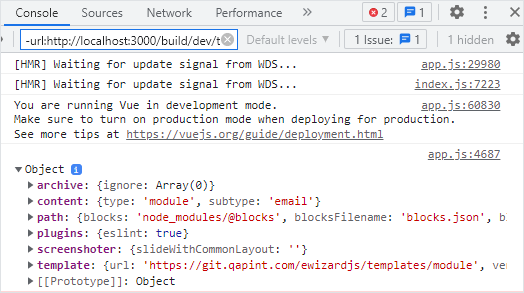
You can check all the fields available in the .ewizard/settings.json with a development build.
To view all fields from the .ewizard/settings.json file, add the console.log method to the App.vue file of your project.
html
<!-- App.vue -->

<script>
export default {
  mounted() {
    console.log(EWIZARDJS.SYSTEM_SETTINGS);
  },
};
</script>
You can see the object with all the fields of .ewizard/settings.json in the browser console after running the wiz dev --live command.